
Returns on your tax invoices (nota retur, nota pembatalan)
How a VAT-registered business (PKP) handles the VAT side of a credit note: the buyer makes the return in Coretax, you check it and approve or reject it there, and record each step in Adimone.
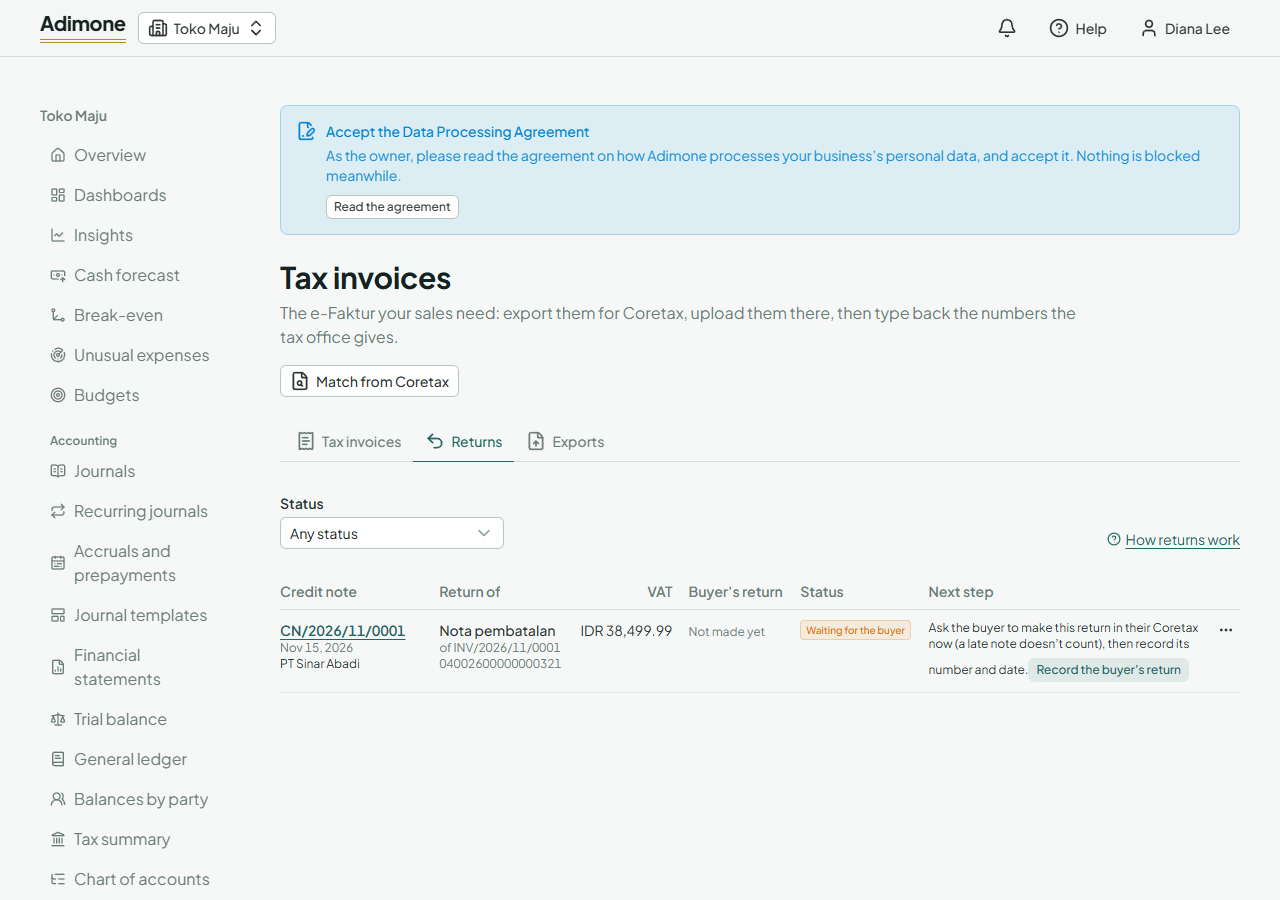
When you post a credit note for an invoice that has a tax invoice, the VAT on what you took back has to come off the tax invoice too. Coretax does that with a return, and the buyer makes it, not you. Adimone lists every return, says what happens next and where, and keeps the month each one counts in.
Before you start
You need a credit note posted for an invoice whose tax invoice is in Adimone (see Issue tax invoices), and permission to manage tax invoices. Your returns are under Tax invoices, on the Returns tab, and each credit note shows its own under VAT returns.
Two kinds of return
The law names two notes, both made by the buyer in Coretax and delivered to you (PMK 81/2024, articles 288 and 289):
- a nota retur when goods come back;
- a nota pembatalan when a service is cancelled.
A credit note with both goods and services makes one of each. A note counts only if the buyer makes it when the goods come back or the service is cancelled, fills it in completely, and it reaches you. Otherwise it is treated as never made, and the VAT stays on your tax invoice.
A return, a cancellation or a replacement
Pick the one that fits what happened:
- Some goods came back, or part of a service was cancelled: post a credit note for those lines. That makes a return, line by line, for what came back only.
- The whole sale was called off, or the tax invoice shouldn't have been issued: void the invoice instead. That cancels its tax invoice (see Voided invoices). When a credit note takes back the whole invoice, Adimone asks you about this before you post it.
- An amount or a detail was wrong: void the invoice, post the corrected one and make its tax invoice the replacement.
Goods swapped for the same goods (same quantity, kind and price) need no note at all (PMK 81/2024, article 286(4)).
Ask the buyer
Every return starts as Waiting for the buyer. Coretax has no way for you to make it, so tell your buyer, promptly, to make it in their own Coretax:
- They open e-Faktur, then Pajak Masukan (Input Tax), and find your tax invoice.
- They choose Buat Retur and enter the lines and quantities that came back, matching your credit note.
- They upload it. That needs a Coretax user with signing rights for their business (its PIC, a signer or an authorized representative), signed in as the business.
A buyer that isn't a VAT collector makes the return too. It gains no VAT credit by it: it reduces the cost or asset it bought instead. Your tax invoice needs its 17-digit number first: until it has one, the return says to record that number (see Type back the numbers).
Record the return
Coretax notifies you when the buyer has made it (Portal Saya, then Notifikasi Saya): it names your tax invoice, the buyer and the return's number. In Adimone, open the Returns tab, find the credit note and choose Record the buyer's return. Copy the return's number, its date and its base (DPP) and VAT (PPN) in rupiah from the notice or from Retur Pajak Keluaran in Coretax. The return is then To check.
Check and approve or reject
A notice alone is no reason to approve. Choose Check and approve: Adimone shows the credit note and the buyer's return side by side, with the difference in the base and the VAT. A credit note in another currency is converted at the Kurs Pajak of the tax invoice's date.
- They match: approve the return in Coretax under Retur Pajak Keluaran, then choose Record approved.
- They differ: find out why first. Reject it if the buyer took back more than you credited, or correct your credit note. Approve a difference only after checking it, and tick that you did.
- Rejected: reject it in Coretax, then choose Rejected in Coretax and say why. The buyer makes it again, and you record the new one.
When Coretax shows a return canceled while its credit note stands, record it canceled: it waits for the buyer again.
A voided credit note
Voiding a credit note before the buyer made its return cancels the return in Adimone. Once the buyer made it, the return becomes To cancel: cancel it in Coretax, then choose Record it canceled in Coretax. Until then it still counts in its month.
Which month a return counts in
A return is reported in the month of its own date, not in the month of the invoice or the credit note. Your approved returns reduce output VAT in that month's SPT Masa PPN (part A.2); the buyer reports them in its input VAT (B.2 or B.3). The Returns tab marks a return dated in another month than its credit note, and the tax summary lists the returns of each month by their date.
Returns and a replacement
A replacement tax invoice (faktur pengganti) must take out the returns already made on the original (PER-11/PJ/2025, article 48). When you replace one, Adimone shows which returns the replacement carries:
- returns of the original that Coretax approved: they no longer stand on their own;
- credit notes of the corrected invoice: they are taken out of its lines in the file.
If the corrected invoice doesn't look net of the approved returns, Adimone warns you: post it without the returned goods, or credit them again on it, or cancel the tax invoice instead. When a carried return was already reported in an earlier month, correct that month's SPT Masa PPN once the replacement is approved.