
Taxes on subscriptions
Choose the countries paid plans are sold in, keep each country's tax terms, see who a change reaches, and switch on Indonesia's PPN once Adimone is registered.
The invoices Adimone sends businesses for their subscription carry the taxes of each business's billing country (and region, where a region adds its own). Those taxes come only from the terms you keep under Taxes in the admin console; catalog prices never assume a tax, and no tax is charged where Adimone isn't registered. Billing admins change them, after confirming with a passkey; Support can look.
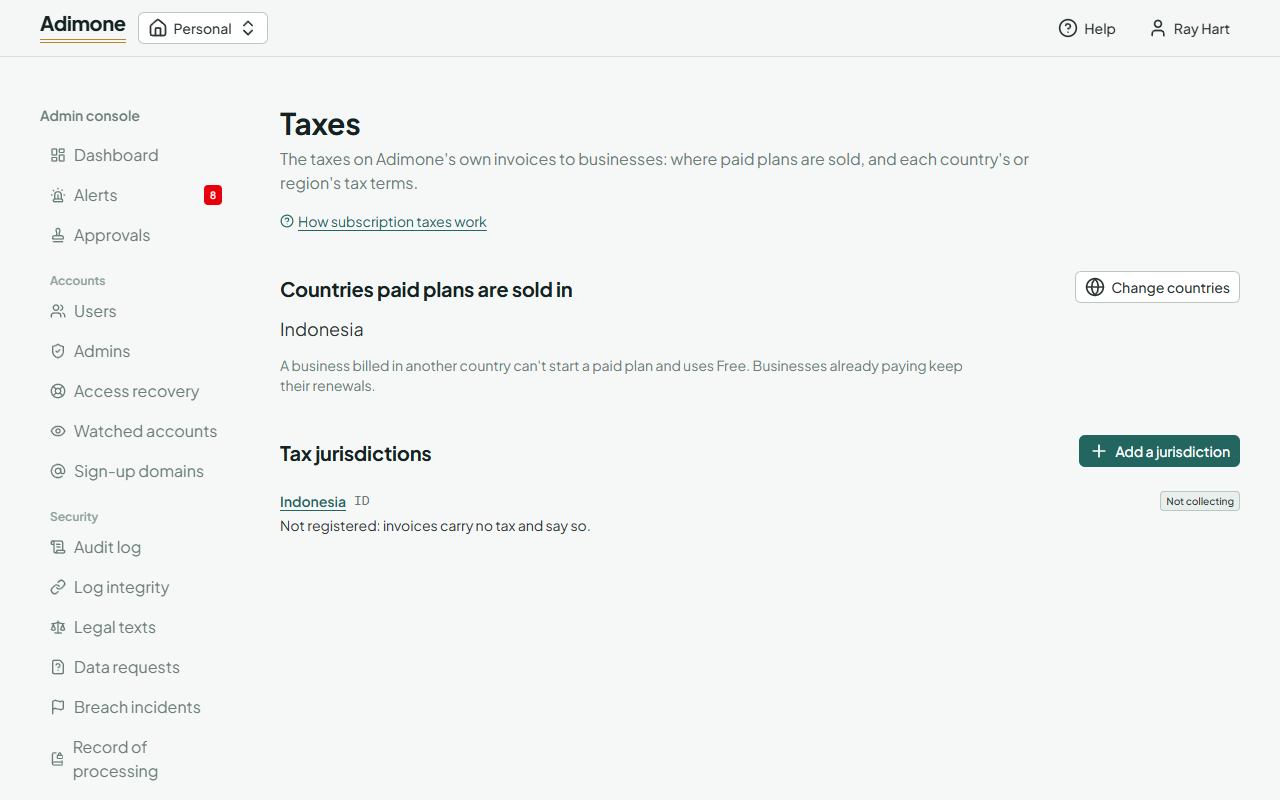
Countries you sell in
Countries paid plans are sold in lists where a business can start a paid plan. A business billed anywhere else stays on Free, and the billing page tells its owner. Choose Change countries, pick them and give a reason. Removing a country doesn't stop businesses already paying there: they keep renewing.
Add a country's tax terms before you add the country: until it has some, its invoices carry no tax.
Add a jurisdiction
A jurisdiction is a country (code ID) or a region that adds taxes to its country's (code US-CA, after its country has one). Choose Add a jurisdiction, enter the code and the name operators see, then its first terms (below) and Save version.
Change the terms
Open a jurisdiction to see its Versions, the latest first: the one In effect, any Scheduled for a later day, and the ones Replaced. Terms in effect never change. To change them, fill in the next version, which starts as a copy of the latest, and choose the day it applies (Applies from, today or later; the first of next month is suggested). Saving another version for a scheduled day replaces that one. Start from this copies an older version into the form.
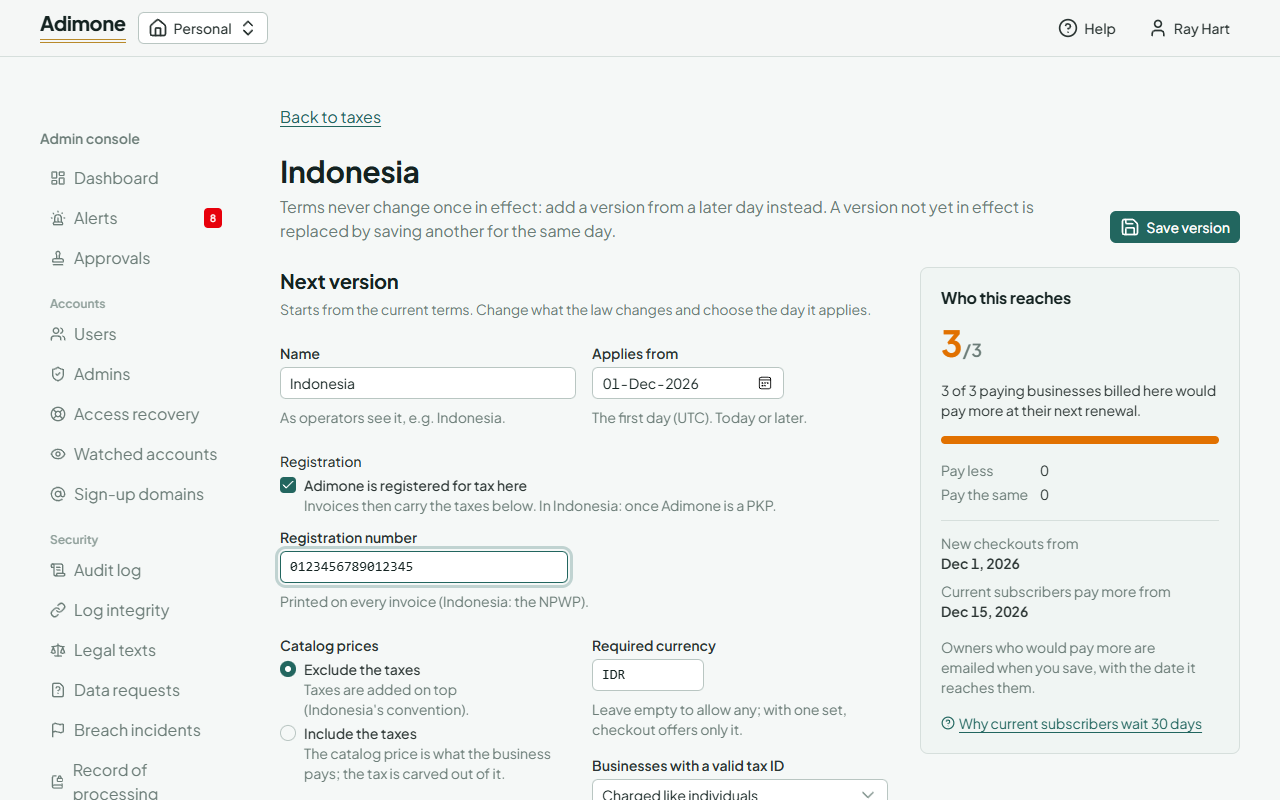
The terms:
- Adimone is registered for tax here and the Registration number printed on every invoice. Unregistered, invoices carry no tax and print the not-collected note.
- Catalog prices: Exclude the taxes adds them on top (Indonesia's convention); Include the taxes keeps the catalog price as the total and carves the tax out of it. A region follows its country.
- Required currency: set it where invoices must be in the local currency; checkout then offers only it.
- Businesses with a valid tax ID and the Tax ID format (a regular expression for the whole ID; Indonesia's NPWP is 15 or 16 digits): charge them like anyone else, let them account for the tax themselves (Reverse charge), or exempt them.
- Taxes, in the order they are charged, up to five: each with its code, the name printed on invoices, the rate, the share of the price it's charged on (Indonesia's PPN: 12% on 11/12), whom it's charged to, and whether it's charged on the taxes before it (Compound).
- Notes on invoices in English and Indonesian: printed under the tax lines, for a reverse charge, and while not registered. Empty notes use the standard wording.
Every save is in the audit log with the terms before and after (Who changed what).
When a change reaches businesses
While you edit, Who this reaches counts the paying businesses billed there that would pay more, less or the same at their next renewal, and shows two dates:
- New checkouts from: the day the version applies.
- Current subscribers pay more from: 30 days after you save at the earliest. A rise saved less than 30 days before a renewal waits; a cut applies on its day.
Owners who would pay more get an email when you save, with the old and new amounts and the date. Their billing page shows the same.
Switch on Indonesia's PPN
Indonesia's terms come set up but not registered: PPN 12% on 11/12, prices excluding it, invoices in rupiah, NPWP as the tax ID. Once Adimone is a PKP:
- Under Settings, fill in Name and address on Adimone’s invoices with the legal name and address registered with the tax office (Change product settings).
- Open Indonesia, tick Adimone is registered for tax here, enter the NPWP as the registration number, check the PPN line, and choose the day PKP status starts (or the first day you'll charge it).
- Check Who this reaches, then Save version with the reason (for example the PKP confirmation's number).
- Set the pricing page's note to match (below).
The pricing page's note
The marketing site's pricing page says whether prices include PPN. Its prices_tax setting (site/site.config.json) must match Indonesia's terms: none while Adimone isn't registered, exclusive once PPN is added on top, inclusive if prices ever include it. Rebuild and publish the site after changing it.
Paid from abroad
An invoice is taxed for the business's billing country. When the card that pays it was issued in another country, the business may really be based there, and its invoices may carry the wrong country's taxes. Nothing is blocked: the invoice is paid, and it waits under Billing, Paid from abroad for a billing admin to check it with the owner.
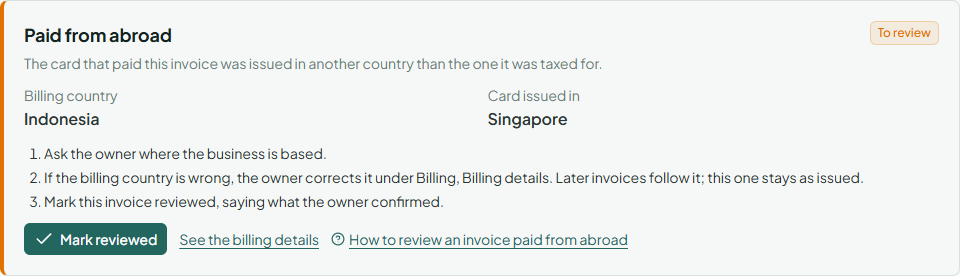
- Open the invoice from Paid from abroad. It shows the Billing country and where the card was issued.
- Ask the owner, by email or through support, where the business is based. To compare with what they saved, choose See the billing details and Show billing details on the business's page (each opening is recorded in the audit log).
- If the billing country is wrong, the owner corrects it under Billing, Billing details in their business. The change is in the audit log, and later invoices are taxed for the new country; the paid invoice stays as it was issued. If its taxes must be put right, refund it and let the owner pay again (Refunds).
- Back on the invoice, choose Mark reviewed and give the reason: what the owner confirmed. It leaves the list, and the invoice shows Reviewed.
Card payments the gateway doesn't report a country for never appear here.
The monthly tax export
Each month, the jurisdiction's page gives what its taxes came to, for the tax return (in Indonesia, the PPN return once Adimone is a PKP). Billing admins only.
- Open the jurisdiction under Taxes and go to Monthly tax export.
- Pick the Month (last month is chosen) and choose Show the totals: for each tax, what the paid invoices were charged on and charged, what credit notes gave back, and the Net tax to report.
- Choose Download CSV for the line-by-line file: every tax line of each invoice paid and credit note issued in the month, with the business's legal name, tax ID and country. Credit notes are negative. Keep it with the return.
Invoices count in the month they were paid, credit notes in the month they were issued, both by UTC. A country's export takes only its own taxes; a region with taxes of its own has its own export. Each export is recorded in the audit log, since the file holds businesses' tax IDs.