
Breach incidents
When personal data leaks, is lost or is reached by someone who shouldn't have it, tell the people affected, the owners of the businesses affected and the authority within 3×24 hours.
Indonesia's personal data protection law (UU PDP) asks Adimone to give written notice of a personal-data breach within 3×24 hours of discovering it: to everyone whose data was affected and to the authority. The owner of each affected business is told too, since they answer to their own customers. Security admins and superadmins handle incidents in the console under Security, Breach incidents.
Open an incident
Open one as soon as you know personal data was breached, even before you know everything: the clock runs from discovery either way.
- From an alert: on the alert's page, choose Open a breach incident. The alert's account, address and business are traced and listed as affected.
- From an account's security timeline: choose Open a breach incident above the timeline. The account and the businesses it touched are listed.
- By hand: Open an incident on Breach incidents, then add who was affected on its page.
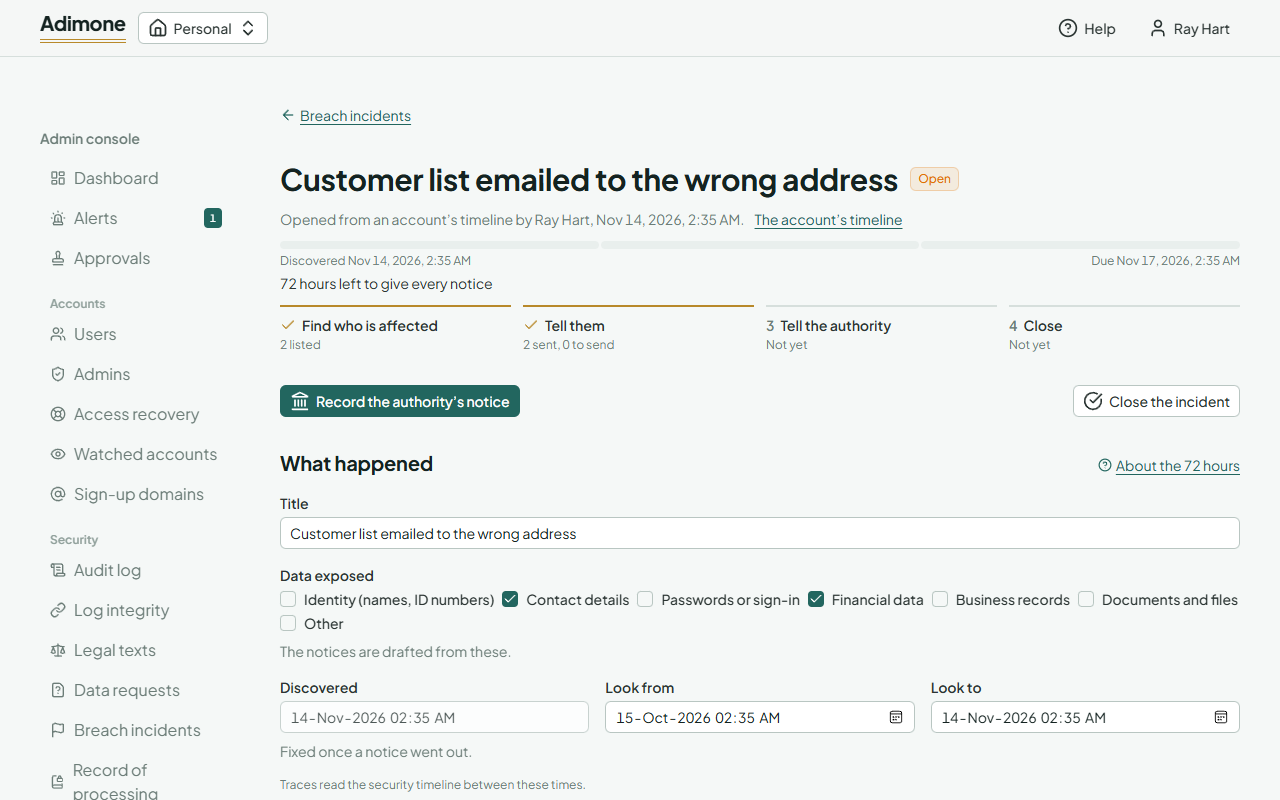
Give it a title, tick the kinds of data exposed (the notices are drafted from them) and, if it was found earlier, when it was discovered (up to 30 days back).
The 72-hour clock
The bar under the title is the 3×24 hours from discovery to the deadline, one segment a day: it turns amber in the last day and red once the deadline has passed with a notice still to give. The incident is overdue until every affected account and business has been sent its notice and the authority's notice is recorded. The discovery time can be corrected until the first notice goes out; after that it is fixed.
Work an incident
The steps under the clock show what is done: find who is affected, tell them, tell the authority, close.
- Who is affected: trace an account, a session or an IP address through the incident's window (Look from, Look to): the accounts found and the businesses they touched are added. Add an account or a business by its id, or remove one whose notice hasn't gone out. A business's notice goes to its owner; a personal workspace is never listed, since its owner is the account itself.
- Notices: the texts for accounts and for business owners come drafted in English and Indonesian; edit them, save, and use Preview to read the email as it will arrive (each reader gets it in their own language). Draft again rewrites the texts not sent yet from the facts.
- Send notices: after you confirm it's you with a passkey, the pending notices go out by email. Accounts that are no longer active and businesses without an owner are marked as not sent, with the reason. A text is kept as it was once its notices went out.
- The authority: copy the authority's text (in Indonesian, with the counts) into the authority's own channel, then Record the authority's notice with where it went and its reference. It is kept from then on.
- Close the incident with what was done. Closed needs every notice given and the authority recorded; Dismissed is for an incident that turned out not to be a breach, and only before any notice. A closed incident can no longer change.
Every step is in the audit log, with who did it and when.