
Type amounts and numbers
Type amounts, quantities and rates without grouping; '.' or ',' is the decimal point, and the number shows as it was read.
Fields for amounts, quantities, prices and rates read numbers the way you type them, on any keyboard and from the numpad.
Type a number
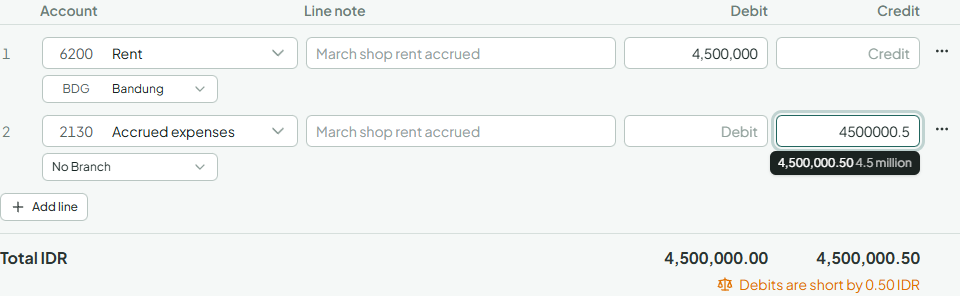
- Click into the field. The grouping goes away, so the field holds only digits and the decimal point: 1,500,000.50 becomes 1500000.50.
- Type the number without grouping. Either
.or,is the decimal point, so 1500000.5 and 1500000,5 are the same amount in English and in Indonesian. The numpad's decimal key types your language's mark. - Check the line under the field (above it, at the foot of a dialog): it shows the number as it was read, grouped, with its size in words, such as 1,500,000.5 1.5 million. A missing or extra zero shows here before you leave the field.
- Leave the field, or press Enter to save. The number is grouped again the way your language writes it.
Grouped and pasted numbers
- A number with several marks, such as 1.234.567,89 pasted from a bank statement, is read the way your language writes it.
- A currency in front, such as Rp 1.500.000 or US$12.50, is dropped.
- In a currency without decimals, such as the Rupiah, a mark before exactly three digits groups thousands: 1.500 is one thousand five hundred.
- In English, a
,before exactly three digits groups thousands too: 250,000 is two hundred fifty thousand. - Text that isn't a number stays as you typed it, and the field says what to fix when you save.
Where numbers are typed this way
Every field for money, a quantity, a price, a rate or a percentage works the same way: journals and documents, the till, shifts and refunds, bank transfers, reconciliations and bank rules, items, prices and units, stock counts and adjustments, expense claims, tax codes and exchange rates, credit limits, approval and alert amounts, and number custom fields and their filters. In a field for an amount, the decimals follow its currency, so in Rupiah 1.500 is always one thousand five hundred.
Small counts, such as days, a sort order, the number of decimals or a document's next number, are plain number fields.