
Contact support and send feedback
Ask Adimone support a question and get a reply by email, report a bug or suggest a feature, and what to do when you can't sign in.
There are two ways to reach Adimone from the app. Contact Adimone support when you need an answer: a person reads your message and replies by email. Report a bug or suggest a feature when you want to tell the team that plans Adimone about a problem or an idea: nobody replies to reports, but every one is read.
Both are in your account menu (your name at the top of the screen) and at the foot of the help panel, under Still stuck?
Contact Adimone support
- Open your account menu and choose Contact Adimone support.
- Under What is it about?, choose the topic that fits best, such as Plans and billing or Taxes.
- Look at the articles under These may answer it already. The first one is about the screen you're on. Choosing one opens it in the help panel; your message is kept, so you can come back to it from the account menu.
- Write Your message: what you were doing, what happened, and what you expected. Never send passwords or card numbers.
- Under Which business is it about?, choose the business, or My account, not a business. Support sees the business's name, not its books.
- Choose Send to support.
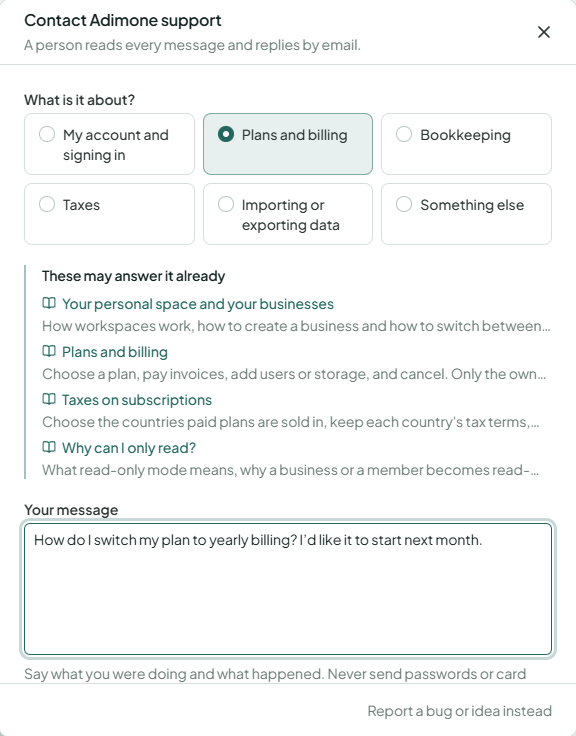
We reply by email to your account's address, in the language you were using when you wrote. How quickly we reply depends on your plan, not on the topic you chose.
Your support messages
Your support messages lists every conversation you've had with support, newest first, with its status:
| Status | What it means |
|---|---|
| Waiting for support | Support hasn't replied yet, or you wrote back since. |
| Answered | Support replied. The reply is also in your email. |
| Closed | The conversation is finished. |
Open it from the link at the foot of Contact Adimone support, or from the link in support's reply email. Open a conversation to read the whole thread. To add something, write it under Write back and choose Send. Writing back to an answered conversation opens it again. A closed conversation can't be answered; contact support again with a new message instead.
Sometimes support moves a message to the feedback queue, when it turns out to be a bug report or a feature request. The conversation then shows Moved to the feedback queue and is closed.
Report a bug or suggest a feature
- Open your account menu and choose Report a bug or suggest a feature.
- Choose Something's wrong for a bug, or An idea for a feature or change you'd like.
- Describe it. For a bug, say what happened and what you expected.
- Tick You may contact me about this if support may write to you about it. Without it, the report keeps no trace of who sent it.
- Choose Send the report.
The report includes the name of the screen you were on (not what's on it), the app version, your browser and your language. Nobody is alerted and nobody replies; to get an answer, contact support instead.
When you can't sign in
Contacting support needs your account. If you can't sign in at all, first try Forgot your password? on the sign-in page (see Reset your password) or account recovery. If that doesn't help, write to [email protected]; the address is also on the sign-in page.
Service status
When something seems broken for everyone, check Service status in your account menu or the help panel. It shows whether Adimone is working normally and what is being fixed. If there's a known problem, you don't need to report it.