
Plan payments with the payment schedule
See your open vendor bills by when they fall due, how much is already planned to pay, and pay what isn't.
The payment schedule lists the vendor bills you still owe on, by when they fall due, earliest first. It tells you how much money you need this week and this month, and which bills no payment covers yet.
Opening it needs permission to see purchasing and purchase prices.
Read the schedule
- Open Payment schedule in Purchasing.
- At the top, a strip per currency shows what you have to pay, split into Overdue, Due within 7 days, In 8 to 30 days and Later. The gold line under it shows how much of that is already planned.
- Below, the bills are grouped the same way. Each shows its due date and how far off it is, the vendor, the vendor's invoice number, what it still owes, what is Planned and what is Still to plan.
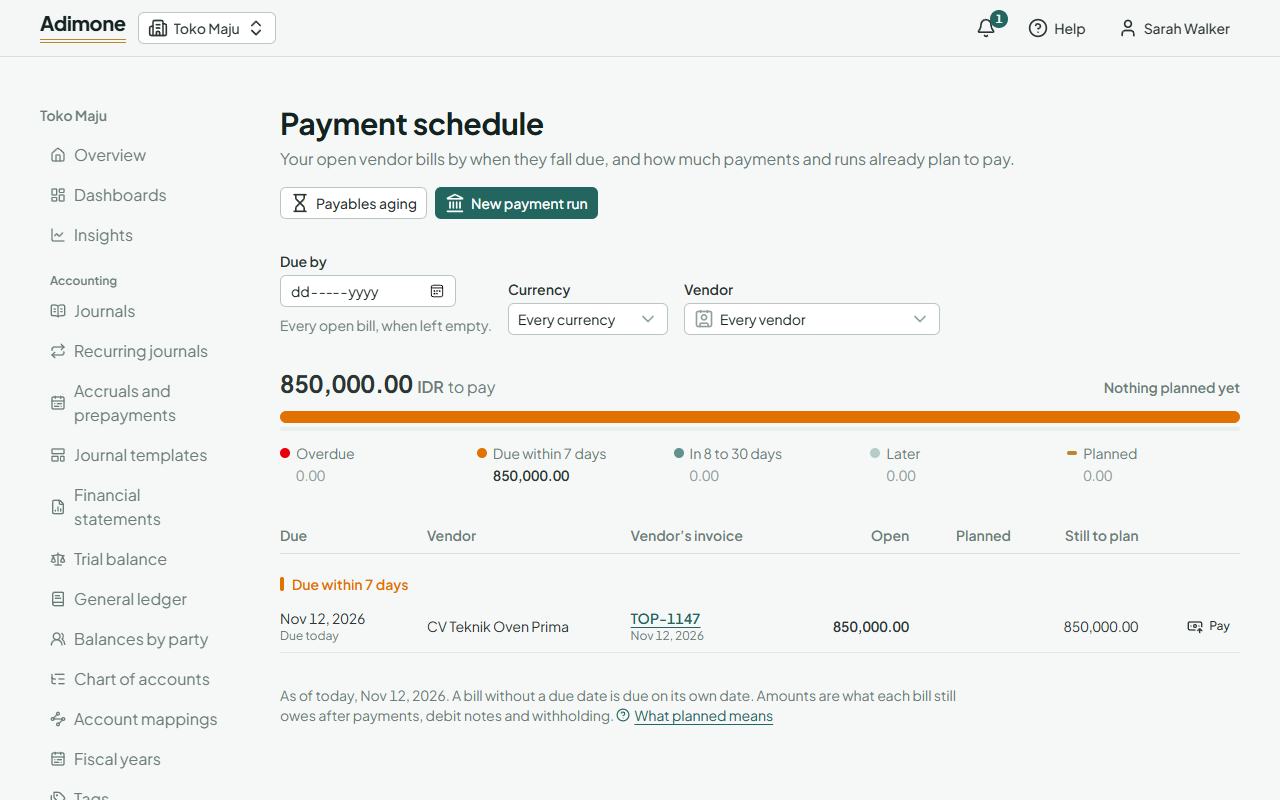
The schedule is always as of today, in your business's time zone. A bill without a due date is due on its own date. Use Due by to see only the bills due by a day, for example the end of the month, and Currency or Vendor to narrow it further.
What planned means
A bill is planned when a draft payment or a draft payment run already includes it. Planned money hasn't left your account yet: once the payment or run is released, the bill owes less and leaves the schedule when it is paid in full. Deleting the draft makes the bill unplanned again.
If a bill is planned twice, for example in a run and in a draft payment, the planned amount can be more than what it owes. Check the drafts before releasing them.
Pay what isn't planned
- Pay on a bill opens a new payment to its vendor, with that bill already chosen.
- New payment run gathers every bill due by the day in Due by into one run, to pay by bank transfer. It needs the purchasing feature of your plan.