
Chase overdue invoices with payment reminders
Remind customers of invoices past their due date, firmer each time, by email every morning or when you choose, and hold reminders back for disputes and payment plans.
A payment reminder is a letter listing a customer's invoices that are past their due date, with what each still owes and the balance due. Adimone can send them every morning by itself, getting firmer the later the invoices are, or you can send one whenever you choose.
Seeing what is overdue needs permission to see sales and sales prices. Sending reminders, holding them back and changing the settings needs permission to manage payment reminders, which accountants and sales staff have; emailing them needs permission to send sales documents.
Levels
Open Payment reminders in Sales and choose Settings.
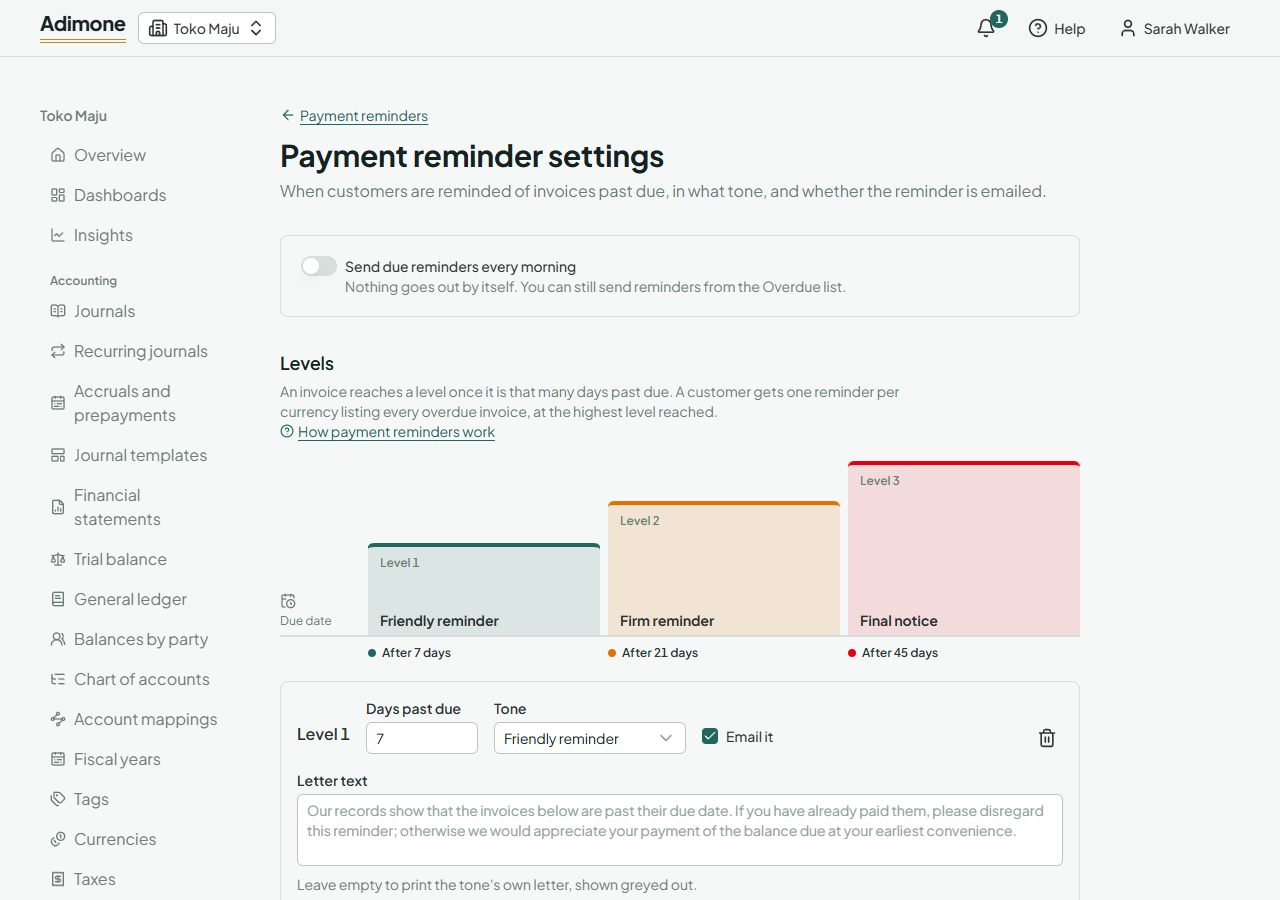
An invoice reaches a level once it is that many days past its due date. Each level has:
- Days past due, later than the level before (up to 365 days).
- A Tone: a Friendly reminder, a Firm reminder or a Final notice. Each prints its own letter, shown greyed out in Letter text.
- Email it: whether the reminder goes to the customer's primary contact, or is only issued for you to print or send.
- Letter text, if you want your own words instead of the tone's letter.
You can have up to five levels. Until you save, the levels are 7, 21 and 45 days, all emailed.
Switch on Send due reminders every morning and save to start the daily run. Whoever saves the settings switched on becomes the member the reminders are sent as. If that person later leaves the business or loses the permissions it needs, the run stops and the page says so: save the settings again to become the sender and restart it.
What the daily run sends
Early each morning (about 8 am in western Indonesia) the run looks at every posted invoice that still owes something and is past its due date. A customer gets one reminder per currency that lists all their overdue invoices, oldest first, whenever one of them reaches a level it hasn't been reminded at. The reminder is written at the highest level reached.
So nothing is sent twice: an invoice reminded at the first level isn't listed again until it reaches the second. A customer whose open credit (payments or credit notes not yet applied) covers what is overdue gets nothing; when credit covers part of it, the letter shows the overdue amount, the credit and the rest as the balance due.
If emailing a reminder failed, the run tries again on each of the next seven days. A customer without an email address still gets the reminder issued; the Overdue list and the run's result name them so you can add an address.
Who owes and what is due
The Overdue tab lists every customer with invoices past due that no hold covers, one row per currency.
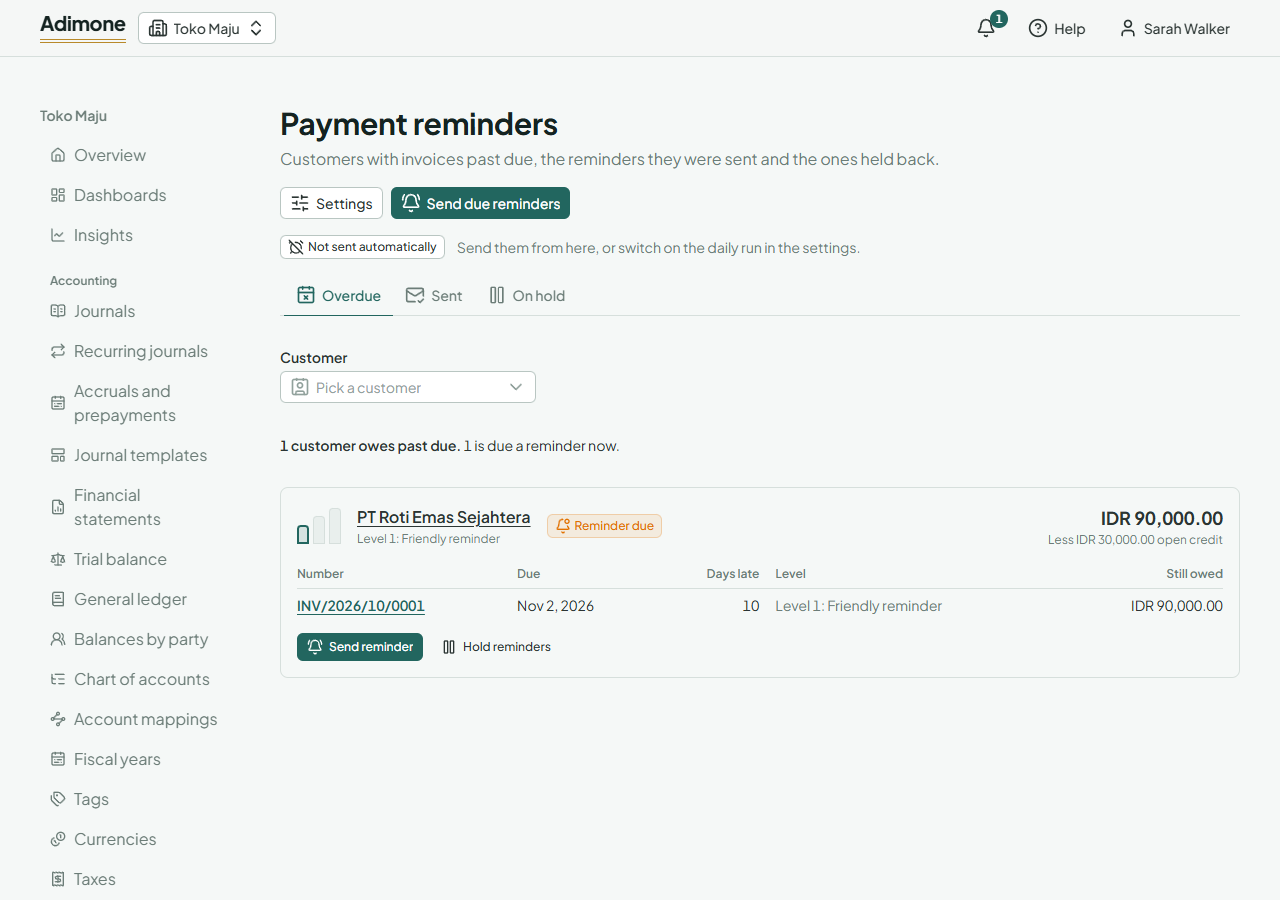
The small steps beside each customer show the levels: a filled step was reminded, an outlined step was reached and is due a reminder now, a grey step isn't reached yet. Reminder due marks the customers the next run will remind. Under each customer are their overdue invoices with the due date, the days late, the level reached and what each still owes.
Choose Send due reminders to send them all now, as the daily run would. It is safe to run again: nothing is sent twice.
Sending a reminder yourself
Choose Send reminder on a row of the Overdue list, on the customer's page, or on the customer's receivables aging. Pick the currency and whether to email it or issue it only. The reminder lists every overdue invoice of the customer at the highest level reached, even if they were reminded at it before. Before the first level is reached it prints the friendly letter.
Nothing is sent to a customer whose reminders are on hold; release the hold first.
Reminders sent
The Sent tab lists every reminder, newest first, with its level, whether it was emailed and whether the daily run sent it. Open its PDF, or email it again the same way as other sales documents. An invoice's page shows the level its reminders reached, when it was last reminded and each reminder that listed it.
Holding reminders back
When a customer disputes an invoice or agrees a payment plan, hold reminders back:
- Hold reminders on the customer's page or on a row of the Overdue list holds every reminder to that customer.
- Hold reminders on a posted invoice leaves only that invoice off reminders.
Give a reason, and a Last day held if the hold should end by itself. The owner sees every hold and its reason in their review list. The On hold tab lists the holds; choose Release to end one early. A hold past its last day stays on the list, so you can see later why a customer wasn't chased.